New Official UberTwitter ver 0.945 is now available for download.
This is an upgrade version of the previous beta 6 v 0.932 with many new features compared to the previous official version.
You may browse this web for more information on the new UberTwitter Download OTA from: www.ubertwitter.com/bb/download.php
The BlackBerry Magnum is the rumored next generation BlackBerry smartphone. It is said to feature a Blackberry Storm-like touchscreen as well as a full QWERTY physical keyboard like the BlackBerry Curve, and may be the United States version of the Storm.
The Magnum will be part of the 9000 series, specifically, the Blackberry Bold 9220. It is unclear when the BlackBerry Magnum will be released. Unlike the Magnum, Blackberry Onyx does not have a touch screen, although some remains of an interesting Blackberry, because its technological specifications include the same optical trackpad for the first time used on BlackBerry Gemini. BlackBerry Underground appeared on, the picture shows exactly BlackBerry Onyx 9020 and the Gemini in comparison. The smartphone will integrate 3G connectivity, GPS, Wi-Fi and a screen resolution of 480×360 pixels. Rumors of the BlackBerry device model with the codename "Onyx" have been floating around for a while now and were proven legit when the first photos of it surfaced here at CrackBerry back on May 10th. It always seems that every new BlackBerry smartphone makes a compromise somewhere on its specifications and feature sheet - be it the Bold's camera, or the Curve 8900's lack of 3G, or the Tour 9630's lack of WiFi, or the Storm's lack of memory and snappy OS. RIM has finally packed it ALL into one device with the Onyx -- 3G, WiFi, GPS, 3.2 megapixel camera - and they've done it in a tight form factor. If you put the Onyx side by side with the BlackBerry Bold and compare the specs, you realize the triumph in engineering RIM has accomplished here. So if you're relaxing this Memorial Day weekend, grab a bevvie, sit back and read on to see tons of photos, a video and some first impressions of the BlackBerry Onyx.
BlackBerry-maker Research In Motion (RIM) has issued a critical security advisory related to a flaw in its BlackBerry Enterprise Server (BES) software that could enable hackers to execute malicious code and hijack infrastructure. The vulnerability is currently ranked as both a 9.2 and 5.7 on a scale of 0 to 10, with 10 representing the most critical flaws.
The vulnerability relates to the PDF distiller component in the BES BlackBerry Attachment Service, which controls the way PDF files are handled in a BES environment. The PDF distiller is a problem area for RIM and its BES software; a variety of security flaws have been identified within the component during the past years, and RIM has issued a number of similar advisories, most recently last July.
BlackBerry administrators running BES 4.1 service pack 3 (v4.1.3) or higher should visit RIM's server download page immediately to update their software and resolve the issue. BES 4.1.2 and earlier is not affected by the flaw, RIM says.
The new vulnerability is ranked as both a 9.2 and 5.7 on the Common Vulnerability Scoring System (CVSS), because tools to help combat the issue are available from Microsoftfor Windows BES software, reducing the threat level in some cases.
Earlier this week, RIM released BES 5.0 SP1 for both Microsoft Exchange and Lotus Domino. BES 5.0 SP1 users should also visit RIM's server downloads page to install the required security update, according to RIM.
From the security advisory:
"Multiple security vulnerabilities exist in the PDF distiller of some released versions of the BlackBerry Attachment Service component of the BlackBerry Enterprise Server. These vulnerabilities could enable a malicious individual to send an email message containing a specially crafted PDF file, which when opened for viewing on a BlackBerry smartphone that is associated with a user account on a BlackBerry Enterprise Server, could cause memory corruption and possibly lead to a Denial of Service (DoS) condition or arbitrary code execution on the computer that hosts the BlackBerry Attachment Service component of that BlackBerry Enterprise Server."
RIM recommends updating affected BES software immediately, and admins may also choose to disable PDF processing in the BlackBerry Attachment Service. Specific instructions on how to do so are also available on RIM's site, along with general BlackBerry security information.
RIM also identified another less-severe bug in some versions of its new BES 5.0 SP1, which causes users' address book listings to disappear after the 5.0 SP1 upgrade. The BlackBerry-maker has not yet issued an official fix for this problem, but additional information and a workaround can be found on RIM's site.
Copyright (c) 2009, IDG News Service. All rights reserved. IDG News Service is a trademark of International Data Group, Inc.
The reason I am sharing this simple and rewarding information is because I feel Berry Owners should have the right to use their phones freely where ever they are in the world.
Steps
Call your carrier.
Ask for the MEP code.
Give them your IMEI number.
To get your IMEI number, type this on your phone, *#06#, and it should pop up.
Once you get your MEP code, turn off your wireless radio on your phone.
Go to SETTING or OPTIONS.
Then go to ADVANCE OPTIONS.
Then go to SIM CARD
Type "MEPD" on your phone.
You should see "Network as Active"
Hold SHIFT + type "MEPE" or "MEP2"
You should see "Network as Disabled"
You are now the proud owner of an unlocked Blackberry
Article provided by wikiHow, a wiki how-to manual. Please edit this article and find author credits at the original wikiHow article on How to Unlock Your Blackberry. All content on wikiHow can be shared under a Creative Commons license.
Security is everything these days. Including mobile phones, so you need to secure your Blackberry soon. This is how to change a password on your Blackberry:Note: This article concerns a Blackberry curve using AT&T; results may vary on provider.
Steps
Go to the "Options" menu, there is a spanner icon on it.
Scroll down the menu to "Security Options". Click it.
It will take you to a screen with multiple choices on it, scroll down to "General Settings" click it.
This takes you to another screen, follow these steps on this screen:
Click the option for "Password:", it is automatically disabled. Click it.
Choose the option that says, "Enabled".
A screen will appear, enter your password. If no screen appears, you may have already set a password for another application, (Password Keeper etc.) that is your default password.
Set your number of password attempts. This is how many times you can guess your password before your phone is wiped/blanked of all it's memory. Use with caution.
Security Timeout means if you are not active on your phone for a certain period of time, it will automatically "Keyboard Lock" and you will have to enter your password.
Select yes or no for "Prompt on Application Install".
Finish up. You have now set your password!
Warnings
Make the password easy to remember, if you forget it, everything in your phone will be wiped, including addresses!
Just because your phone gets wiped, doesn't mean it can't get stolen.
Article provided by wikiHow, a wiki how-to manual. Please edit this article and find author credits at the original wikiHow article on How to Set a Password on a Blackberry. All content on wikiHow can be shared under a Creative Commons license.
This article will teach you how to retrieve the unlock code and enter it into your Blackberry 9000-series phone AKA BlackBerry Bold so that it may be used with any cellular network SIM card.
Step 1 First, you need to get your Blackberry's IMEI code. This is a unique identifier of your phone, like a serial number. You can access this code from your phone: 1) Turn your phone on. 2) Click on the "Phone" icon. 3) Enter the following symbols: *#06# 4) After entering the final # symbol, a message will appear displaying your IMEI number. It is a 15-digit number in the format XXXXXX.XX.XXXXXX.X
Step 2 Second, you have to get the unlock code. This can be purchased on the internet, or you may call your cellular provider. Either way, they will ask for the IMEI code which you determined in step one of this tutorial. Move on to step 3 when you have received your unlock code.
Step 3 Follow these instructions exactly to unlock your phone: 1. Make sure your SIM card is NOT inserted into the device. 2. Turn on the phone and click the "Manage Connections" icon. 3. Choose the option "Turn off all connections." 4. The cellular radio will be turned off. 5. Go back to the Home screen and click the "Options" icon and select "Advanced Options." 6. Scroll down and select "SIM Card" from the list. 7. Press the following keys in order: (M) (E) (P) (E) 8. A prompt will appear asking for the unlock code. Input the 16-digit code exactly. 9. Reboot your device. 10. Re-enable the cellular radio
WARNING 1. Be sure to remove the SIM card and disable the cellular radio as instructed. 2. The unlock code is specific to your IMEI so you cannot use a generic or friend's code. 3. If you fail to enter the unlock code 5 times, the phone may be permanently locked to your cellular network.
1. Transfer contacts from the Blackberry address book to Outlook on your computer (or Windows Mail). 2. Sync your iPhone with your computer using iTunes, which will transfer the contacts from Outlook to your iPhone.
Make sure that both the Blackberry Desktop Manager and iTunes are installed on your system, and that your Blackberry is connected to your computer with a usb data cable.
Part1. Transfer contacts from a Blackberry to Outlook Run the Blackberry Desktop Manager program and click "Synchronize" from the main menu screen. Select "Synchronization" below the Configuration menu option to get to the Synchronization Configuration screen.
There you'll click the "Synchronization" button to configure the synchronization settings. You'll be asked to choose the device applications to synchronize. Choose "Address Book", and then choose "Outlook". If you don't have Outlook on your system, then you can choose "Windows Mail" instead.
Next you'll configure how you want to sync your contacts, either bi-directionally or just from your blackberry to Outlook (which is the option I chose):
Click "Next" and then "Finish" to complete the synchronization settings. This will take you back to the synchronization screen. Make sure you check the option to "Synchronize organizer data". This is the setting that tells the program to sync your contacts.
Click the "Synchronize" button to copy the contacts from your Blackberry to your Outlook contacts. You can open Outlook after the sync has completed, and you should see your Blackberry addresses in your Outlook contacts folder.
Part2. Transfer contacts from Outlook to an iPhone You can import Outlook contacts to your iPhone by syncing your iPhone with iTunes. Plug your iPhone into your computer and wait for iTunes to automatically launch (or run iTunes from the Start menu if necessary). Select your iPhone in iTunes, select the Info tab, and then click the checkboxes to sync your contacts. Choose Outlook as the application to sync with. Click Apply, then click Sync.
This will copy the contacts from Outlook over to your iPhone. Remember however, that you can only sync your iPhone with one computer at a time. If you later decide to sync with another computer, your contacts will be erased. Our work here is finished, and your Blackberry contacts will now be copied over to your iPhone.
The new BlackBerry Curve 8900 is a smartphone with a touch of elegance. The pixel display this mobile phone is amazing. With the BlackBerry Curve 8900 Javelin, you can access tons of features including video, images, text and do not forget those maps, but you will also have tons more features for this phone.
The phone offers a 3.2 megapixel camera, a 2.4-inch screen with 480 x 360 resolution, a microSD slot supporting up to 16GB, WiFi and GPS. Equipped with Wi-Fi connectivity for high-speed browsing and downloading 'curve' lets you search through Google or access social networking sites like Facebook at any time. Javelin BlackBerry Curve also includes a media player with a standard 3.5 mm jack so users can listen to your music through your own headphones instead of those provided.
The BlackBerry Curve provides GPS satellite navigation technology with BlackBerry Maps to find routes, attractions and travel planning, while in motion, with built-in GPS and the ability to BlackBerry Maps you text-based step by-step directions to help you find out where and how to get to where it needs to be. The battery of the BlackBerry 8900 is a lightweight, weighing only 110g.
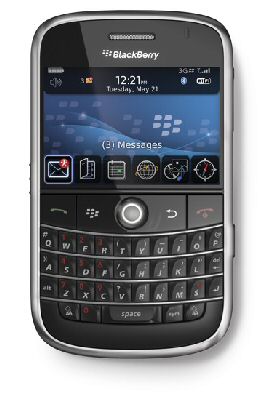
BlackBerry Bold 9000
Due to high soaring mobile phone bills, most of the mobile phone users these days avoid purchasing high priced handsets. The Blackberry Bold 9000 is one of the latest mobile phone and the PAYG phone deals is a popular tariff plan that will let you make mobile expenses within your budget.
The Blackberry Bold 9000 supports a 2 MP camera that can be used to capture both still as well as video footage. The phone has 128 MB flash memory, 1 GB storage memory and 624 MHz processor. Various messaging services such as SMS, MMS, email and instant messaging service options are supported by this phone. This is a 3G enabled mobile phone that sports a bright display. Some of the key features of this advanced mobile phone are a 2.0 mega pixel camera, GPS, Wi-Fi, media player with improved stereo speakers and MicroSD slot that enables the user to expand the memory when required.
Buy Blackberry Bold 9000 PAYG mobile phone to enjoy all these innovative features in one single device. The PAYG deal is also known as pay as you go deal and cane be availed through most of the leading network service providers. The PAYG deal is a prepaid deal that will let the user maintain their mobile phone expenses within the limit that they want.
The Blackberry Bold is one of the latest entrants in the smart phone arena and it is one gorgeous piece of technology. It was designed to take advantage of the speeds available on the HSDPA network. It has twice the screen resolution of the Curve, making for a very sharp display.
The enhanced media player can display pictures and slideshows quickly, play movies smoothly in full screen mode, and manage an entire music collection. Touted as RIM's answer to Apple's iPhone, it offers 3G service, Wi-Fi support, built-in GPS, music and video players, and an absolutely gorgeous screen.
The phone embodies elegant design without sacrificing the features or functionality you expect from a premium smartphone. It provides a rich multimedia experience with a powerful media player for music, videos and pictures, 2-megapixel camera with digital zoom and video recording (requires separately sold microSD/SDHC memory card), externally accessible microSD/SDHC memory card slot for expanded storage (including the upcoming 16GB cards) and easy synchronization support for iTunes digital music collections using the new BlackBerry Media Sync application. It is the first BlackBerry smartphone to support tri-band HSDPA high-speed networks around the world and comes with integrated GPS and Wi-Fi®, as well as a rich set of multimedia capabilities. To help aid in the blazing download speeds, it also features a 624 MHz Intel Processor, where previous Blackberrys had only a 312 MHz processor.
It features a crystal clear high resolution display maximizing the brilliance of WHERE maps. It provides wireless access to email, phone, web and multimedia applications, as well as many other business and lifestyle applications. The phones design and performance live up to it's name and is the most advanced and performance-driven BlackBerry smartphone.